Skip to content
Workout app buying guide

The best workout apps for beginners

Choose between following a program, receiving workout proposals, and logging a routine you already have.

Pick Boostcamp

Best public beginner program library

Pick Fitbod

Best for guided beginner sessions

Pick Hevy

Best free beginner logger

Will Richards
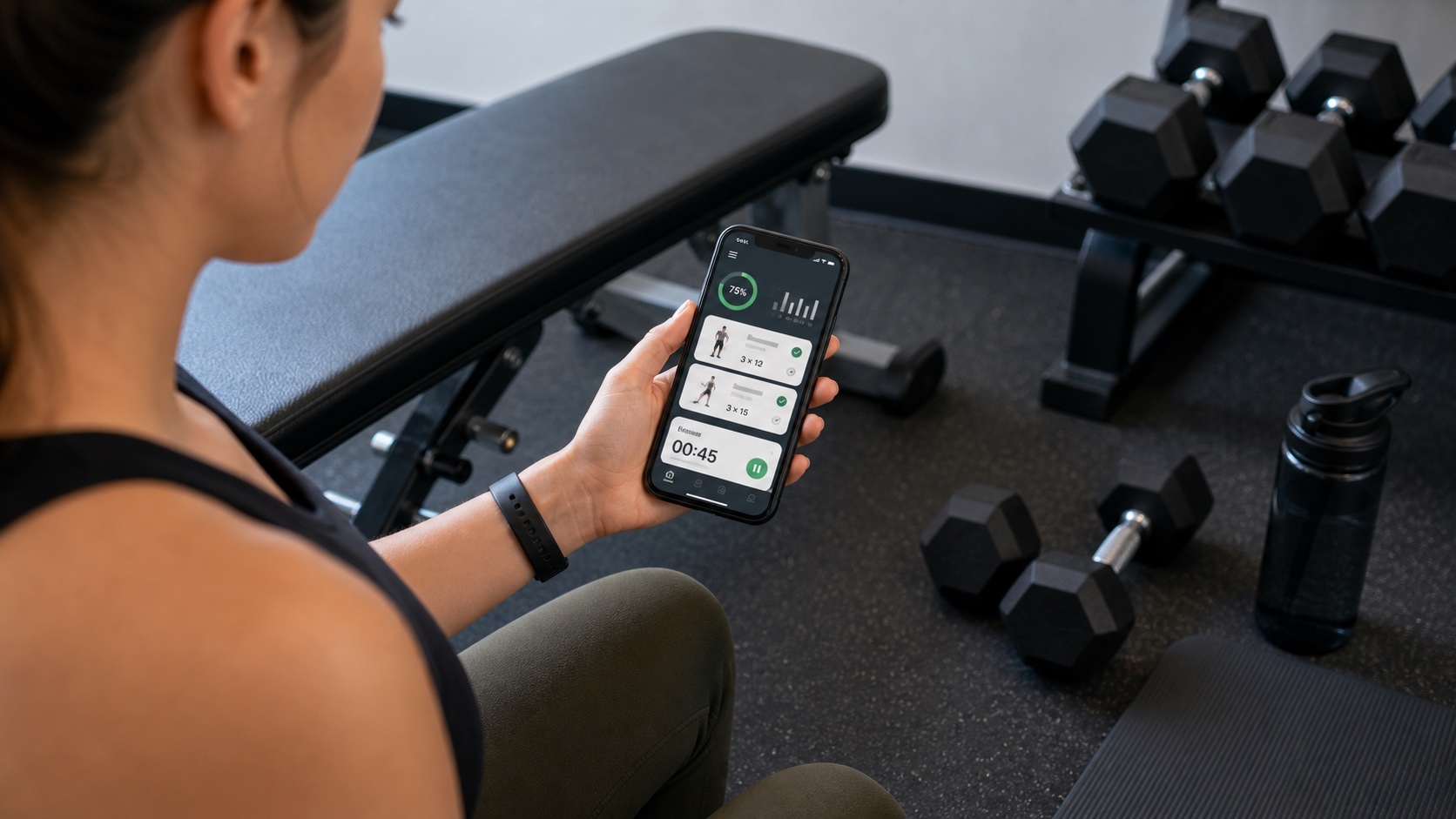
Beginner lifter checking a workout app beside dumbbells before a strength session
Beginner apps should reduce decisions, teach the pattern, and make progression feel clear.

Top picks at a glance

Start with the job you need the app to do, then use the full reviews below to check the trade-offs. A manual logger, an AI coach, and a program library can all be good workout apps, but they solve different problems.

Workflow illustrations

Use these illustrations to compare layouts and training workflows, not as evidence of logging speed, offline reliability, or coaching results.

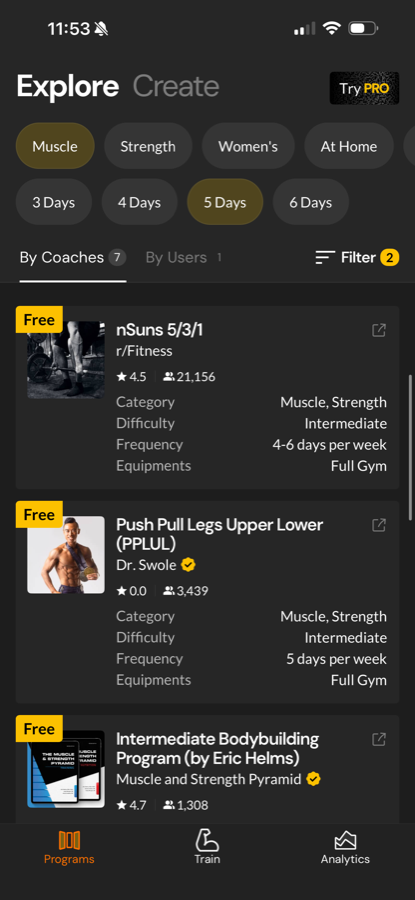
Boostcamp official-site screenshot showing program filters for goals and training days
The filtered-library example illustrates narrowing programs by goal and schedule.
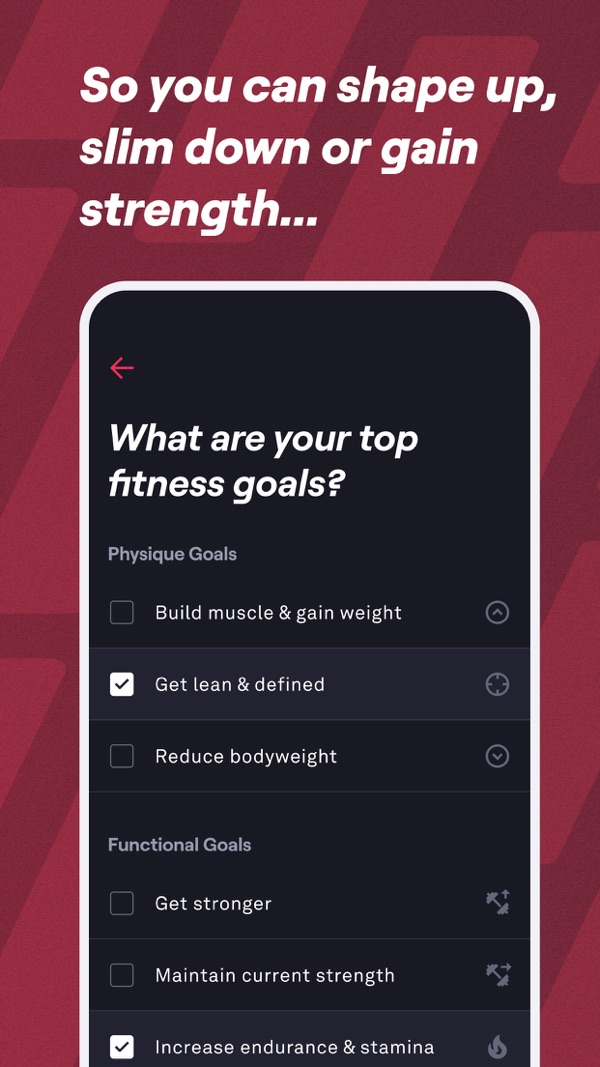
Fitbod publisher screenshot showing fitness-goal selection
The goal-selection example illustrates planning inputs; selecting a goal does not establish that the app will achieve it.
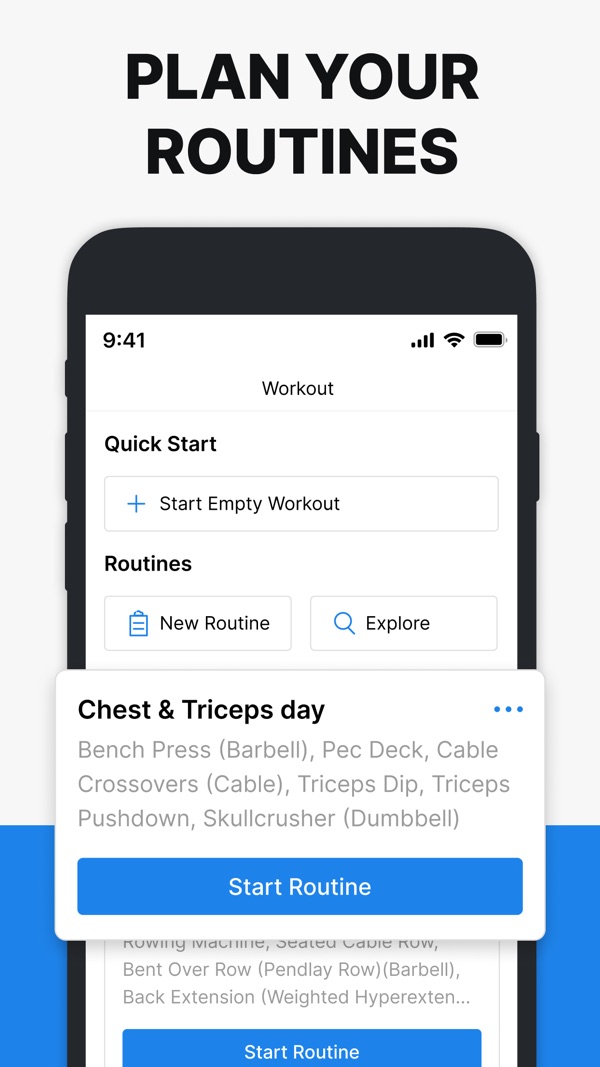
Hevy publisher screenshot showing saved routines and a start-routine button
The routine view illustrates choosing a saved session or starting an empty workout.

The picks, explained

Best public beginner program library

1. Boostcamp

Compare a named beginner program's schedule and equipment requirements before deciding whether it fits your week.

Best for

people who want named programs or manual custom plans with free core logging

Not for

people who need demonstrated conversational coaching or a verified phone-free workflow

Product references

Boostcamp official site and Boostcamp Pro page

Boostcamp supplies a program library, logging, and documented performance-based weight progression. Its custom program tools and paid personalized-program builder are separate choices. For a first plan, inspect the program's experience level, weekly schedule, and required exercises rather than choosing from a popularity badge alone.

Why not ranked higher: The downside is that program templates can still feel rigid. If the plan assumes equipment you do not have, progresses too fast, or clashes with your schedule, the beginner still has to make judgment calls.

Bottom line: Consider Boostcamp when a clearly described beginner program fits your equipment and schedule. A program's presence in the library is not proof that it suits every beginner.

Best for

people who want named programs or manual custom plans with free core logging

Not for

people who need demonstrated conversational coaching or a verified phone-free workflow

Features and plans

App type
Program library and workout builder
Price
Free core; paid Pro
Free tier / trial
Free core program library, full logging, auto-progression, and custom multi-week program building
Platforms
iOS, Android
Apple Watch
Website describes an Apple Watch companion; the App Store listing names only iPhone and iPad, so confirm before choosing it for watch use
Offline logging
Store description documents offline use; sync and device reliability not tested
Program help
Personalized builder in Pro; manual custom programs are free
Generated workouts
Personalized program builder in Pro

Before you subscribe

Check price, free-tier limits, and device requirements at Boostcamp official site, Boostcamp Pro page, Boostcamp free workout app page and Boostcamp App Store listing. A watch app does not necessarily work without a phone or an internet connection. Try saving a short workout and syncing it on your own devices before relying on offline use.

Strengths

  • Library of named coach and community programs
  • Performance-based auto-progression
  • Free manual custom plans; AI-assisted personalized building in Pro

Watch-outs

  • Advanced analytics and personalized programs are Pro features
  • Conversational coaching and offline reliability are not established here
Full Boostcamp review

Best for guided beginner sessions

2. Fitbod

Documents equipment-aware workout proposals for readers who do not want to construct each session themselves.

Best for

generated workouts around your available equipment

Not for

people who only need a free manual logbook or want a demonstrated conversational workflow

Product references

Fitbod membership page and Fitbod subscription help

Fitbod documents workout proposals based on equipment, goals, and training history. That is a reason to investigate it when choosing exercises is the difficult step. It does not establish that every generated session or exercise is appropriate for a particular beginner.

Why not ranked higher: Generated sessions are not always the same as a clear beginner progression. A beginner may still need help understanding why a lift changed, what a training block is doing, or how to interpret stalls.

Bottom line: Choose Fitbod if you want guided workouts quickly and do not need a deeper coaching conversation.

Best for

generated workouts around your available equipment

Not for

people who only need a free manual logbook or want a demonstrated conversational workflow

Features and plans

App type
AI workout generator
Price
US subscription help: $15.99/month or $95.99/year; store pricing varies by region
Free tier / trial
7-day trial after selecting a monthly or yearly plan, then subscription
Platforms
iOS, Android, Apple Watch; Google Play documents Wear OS integration
Apple Watch
Companion: iPhone required to start, add or swap exercises, and finalize/save workouts
Offline logging
Local workout generation and logging; Focus Exercises, some history, and uncached videos need internet
Program help
Generated sessions from training inputs
Generated workouts
Yes

Before you subscribe

Check price, free-tier limits, and device requirements at Fitbod membership page, Fitbod subscription help, Fitbod trial help and Fitbod FAQs. A watch app does not necessarily work without a phone or an internet connection. Try saving a short workout and syncing it on your own devices before relying on offline use.

Strengths

  • Equipment-aware workout proposals
  • Exercise selection can reflect available gym equipment
  • Documented local workout generation and logging offline

Watch-outs

  • Generation documented; conversational coaching not established
  • Focus Exercises and some history/media features need a connection
Full Fitbod review

Best free beginner logger

3. Hevy

Hevy provides free logging for an existing routine and paid Trainer planning when you want generated programs.

Best for

lifters who want free social logging or paid Pro Trainer planning

Not for

people who want Trainer-level planning and progression without a Pro subscription

Product references

Hevy official site and Hevy Trainer announcement

The free logger and Pro Trainer solve different jobs. Trainer's announcement describes generated programs, performance-based weight adjustments, and inclusion in Pro. We have not tested those recommendations, so examine the proposed routine and its explanation rather than treating generated programming as a safety guarantee.

Hevy offers free logging with limits and a paid Pro tier. If a coach or existing program already supplies your sessions, recording sets may be all you need. Check your routine requirements and the current upgrade offer before committing.

Bottom line: Consider free Hevy logging for an existing plan, or investigate Pro Trainer if you also want programming help. Compare those offers separately.

Best for

lifters who want free social logging or paid Pro Trainer planning

Not for

people who want Trainer-level planning and progression without a Pro subscription

Features and plans

App type
Workout tracker and adaptive planner
Price
Free logging; paid Pro (check current local offer)
Free tier / trial
Free logging with limits; paid Pro includes Trainer; check the current local offer
Platforms
iOS, Android, Apple Watch, Wear OS
Apple Watch
Yes
Offline logging
Yes; official watch section says Workout Offline
Program help
Trainer (Pro)
Generated workouts
Trainer (Pro)

Before you subscribe

Check price, free-tier limits, and device requirements at Hevy official site, Hevy Trainer announcement, Hevy workout plan generator and Hevy pricing page. A watch app does not necessarily work without a phone or an internet connection. Try saving a short workout and syncing it on your own devices before relying on offline use.

Strengths

  • Free logging alongside paid Trainer planning
  • Trainer generates personalized programs and adjusts weights from performance
  • Social feed and following

Watch-outs

  • Trainer and its planning guidance are Pro features
  • The core logger still assumes you know which workflow you want
Full Hevy review

Which app should you choose?

Use this section if you already know your training style and just need the fastest recommendation. The ranking above is editorial, but the best answer can change depending on whether you want a ready-made program, generated sessions, or a free logbook.

Choose Boostcamp for

Best public beginner program library

Choose Boostcamp for people who want named programs or manual custom plans with free core logging. It is not the best fit for people who need demonstrated conversational coaching or a verified phone-free workflow.

Choose Fitbod for

Best for guided beginner sessions

Choose Fitbod for generated workouts around your available equipment. It is not the best fit for people who only need a free manual logbook or want a demonstrated conversational workflow.

Choose Hevy for

Best free beginner logger

Choose Hevy for lifters who want free social logging or paid Pro Trainer planning. It is not the best fit for people who want Trainer-level planning and progression without a Pro subscription.

How the picks compare

The best workout apps for beginners
FeatureBoostcampFitbodHevy
Writes your programPersonalized builder in Pro; manual custom programs are freeGenerated sessions from training inputsTrainer (Pro)
Chat coachConversational workflow not established hereNot established by linked documentationNot established by linked documentation
Auto progressive overloadYes; adjusts loads from performanceGenerated targets use training history; exact progression rules are not established hereTrainer (Pro); adjusts weights from performance
Generated workoutsPersonalized program builder in ProYesTrainer (Pro)
Program libraryYesGenerated and saved workoutsSaved routines and Trainer-generated programs
Apple Watch appWebsite describes an Apple Watch companion; the App Store listing names only iPhone and iPad, so confirm before choosing it for watch useCompanion: iPhone required to start, add or swap exercises, and finalize/save workoutsYes
Offline loggingStore description documents offline use; sync and device reliability not testedLocal workout generation and logging; Focus Exercises, some history, and uncached videos need internetYes; official watch section says Workout Offline
Free tierFree core; paid Pro7-day trial, then paid subscriptionFree logging; Trainer requires Pro; confirm current limits
Social / communityCommunity program library and program sharingNot established by linked documentationYes

Table values are category-level summaries. "Limited" means the sources for this guide show a limited, indirect, phone-first, or lighter workflow rather than a complete Apple Watch, offline, or coaching workflow. Offline descriptions are documentation summaries, not results of our own connectivity tests. Confirm whether a workout must be loaded in advance, whether it can be saved without a signal, and how it syncs afterward before relying on an app at a no-signal gym.

Other apps we considered

These apps may still be worth checking if your needs are narrower, but they were not the top picks for this specific strength-training use case.

Strong

Beginners with a coach-written plan

Its documented routines and logging are relevant when you have a plan to record; automated program generation is not established by the sources here.

JEFIT

Beginners who want a large exercise database

Its documented exercise library and routine builder may help you assemble a plan. This guide does not establish comparative beginner usability or the suitability of a particular routine.

How we picked

For beginners, compare the documented plan-selection workflow, exercise instructions, logging requirements, and paid limits. These are editorial criteria, not measured scores or evidence that an app can assess your technique or guarantee safe progression.

For strength training, compare the documented program tools, progression options, equipment choices, wearable support, and plan limits first. Calorie tracking or a large exercise library will not replace a missing program feature you need each week.

We also separate app types before ranking them. A free logbook can be the right answer for someone who already has a program, while a coaching app is a better answer for someone who wants the plan built and adjusted. The goal is not to crown one app for everyone; it is to make the use case obvious enough that a reader can choose quickly.

The order reflects our judgment of documented features for this training need, not measured performance or a numerical rating. Handler is our own private-beta product and is excluded from the public shortlist and comparison table.

Separate disclosure: Handler's private beta

Handler is our own product. Handler is in an invited iOS TestFlight beta and does not have a public App Store listing yet.

The private iPhone test build includes program setup, workout logging, coach chat, history and progress review. Apple Watch is in development and offline logging is under test. These are not verified public capabilities or evidence of better results.

See platform status and pricing status for first-party details.

Sources and further details

Follow these links for plan limits, device compatibility, and the features included in each subscription.

Official product pages, App Store/Google Play listings, help docs, and pricing pages are used for availability, platform, watch/offline, free-tier, and price claims. Third-party or community sources are treated as supporting context only and do not override official evidence. The guide record date is not a source-verification date.

Guide record: June 6, 2026
Boostcamp official siteReference for beginner-friendly program-library positioning.Fitbod official siteReference for generated-workout and equipment-based session positioning.Fitbod offline helpHevy official siteReference for free logging, social, and routine-tracking positioning.Hevy Trainer announcementProgressive overload for beginnersReference for the beginner progression criteria behind this guide.Boostcamp official sitefree program library, performance-based auto-progression, and AI program builderBoostcamp Pro pagePro personalized programs, advanced analytics, trial, and paid feature referenceBoostcamp free workout app pagefree program library, full tracker, custom multi-week builder, and platform availabilityBoostcamp App Store listingiOS availability and in-app purchase referenceBoostcamp Google Play listingAndroid availabilityFitbod membership pagemembership reference; not a verified checkout snapshotFitbod subscription helpsubscription plans, 7-day trial, and regional pricing caveatFitbod trial help7-day trial, auto-renewal, and post-trial access limitsFitbod FAQsbilling, features, integrations, trial, and platform-pricing caveatsFitbod App Store listingiOS, Apple Watch, ratings, and in-app purchase referenceFitbod Google Play listingAndroid availability and user-review contextFitbod Apple Watch helpwatch supportGarage Gym Reviews Fitbod reviewFurther-reading reference only; not used to establish product facts or rankingsLifehacker Fitbod reviewFurther-reading reference only; not used to establish product facts or rankingsFitbod subredditcommunity discussion link; not captured as review evidenceHevy workout plan generatorofficial Trainer page documenting personalized program generation, adjustable working weights, and Pro availabilityHevy pricing pageReference link for checking the current offer; not readable in this audit and not used to establish exact pricesHevy free-version limits helpOfficial reference for free-tier limits; article text verified through Hevy's public help-center APIHevy App Store listingiOS, Apple Watch, ratings, and in-app purchase referenceHevy Google Play listingAndroid and Wear OS availability

Who this guide is for

People choosing a first app

You want to avoid downloading five trackers and need a plain answer about which app fits your training style, budget, and equipment.

Lifters switching tools

You already train consistently, but your current app is too limited, too expensive, or not helpful enough with progression.

People comparing app categories

You are deciding whether you need a manual logger, generated workouts, a program library, or a coach-like product that changes the plan over time.

Before you commit to an app

During a free tier or trial, enter a familiar workout, log a few sets, and find them in your history. Check whether the program tools you need are included in that tier and whether you can change a suggested exercise or weight.

For watch or offline use, try the exact phone-and-watch setup you train with before taking it to the gym. A documented feature is a reason to shortlist an app, not proof that it will work reliably in your setup. Keep your existing log until you know how to export or recover your history.

Frequently asked questions

What is the best workout app for beginners?
Compare Boostcamp for a named program, Fitbod for equipment-aware proposals, and Hevy for free logging or paid Trainer planning. Choose around your schedule and the amount of guidance you need. No comparative safety finding is claimed; Handler remains our separate invited beta.
Should beginners use an AI workout app?
An AI label is not a reason by itself to choose an app. Inspect the proposed routine, required equipment, paid terms, and how you can change a session. Generated plans do not replace individual instruction or establish that the workload suits you.
Do I need to know how to lift before using these apps?
You can explore the apps before training, but exercise instructions and videos cannot assess your individual technique. Start with movements you understand and seek qualified instruction when unsure. An app and a written guide do not guarantee correct form or an appropriate workload.
Should beginners use a workout logger or a workout generator?
Use a logger if you already have a program from a coach, friend, or trusted plan. Use a generator or coach-style app if you need help deciding exercises, sets, reps, and progression.
What makes a beginner workout app good?
A good beginner app should be easy to start, explain what to do, avoid too many choices, track progress clearly, and help you progress without turning every set into a max test.

Invited TestFlight beta · iPhone-first

Interested in testing Handler?

Handler is our own product. Handler is in an invited iOS TestFlight beta and does not have a public App Store listing yet. The private iPhone build includes program setup, workout logging, coach chat, and history and progress review.

Related guides