Available on iOS and Android
Effort Check
Adjust your next set by how the last one felt
Short answer
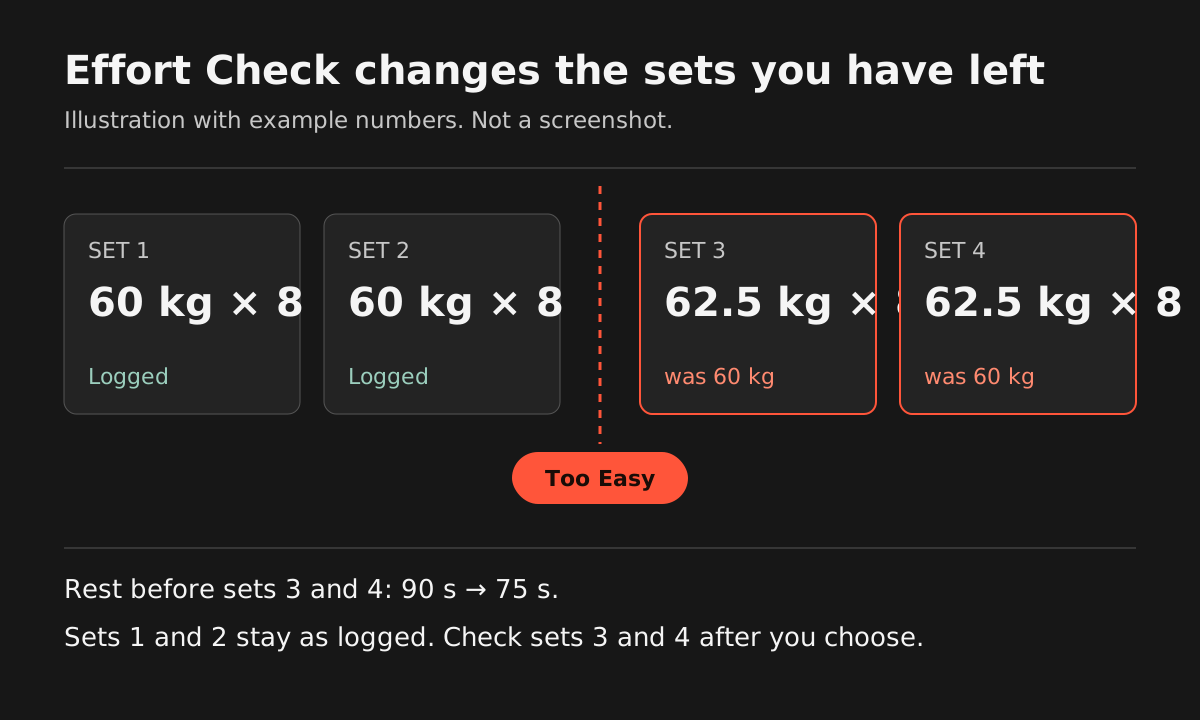
If the set felt easy, add a little weight. If it was solid, or hard but clean, hold the weight. If you barely finished it, take a little off and rest longer. Handler's Effort Check asks “How did that set feel?” after your second working set and suggests a new target for the sets you have left, such as about 2.5 kg more after a Too Easy set.
Updated
Step by step
How it works in Handler
- 01
Log your second working set
Tick off set 2 of an exercise as usual. Warm-up sets don't count, so the question comes after real work.
- 02
Rate the set
The rest screen asks “How did that set feel?” Select Too Easy, Solid, Hard But Good or Maxed Out, then tap Continue.
- 03
Review the suggested target
When a change is proposed, you see your current target next to the suggested one. Too Easy suggests a little more weight and 15 seconds less rest. Maxed Out suggests a little less and 30 seconds more. Solid and Hard But Good suggest no change.
- 04
Apply the suggestion
Tap Apply & Update Next Set, then check the targets for the sets you have left.
- 05
Finish the exercise
Log the sets you have left as usual.
Step by step in the help center: using Effort Check
Rate your next set in Handler. New on iPhone? 7 days free, then $79.99/year in the US. No free version. Get Handler
Next set or next workout
Next set vs next workout
Most progression schemes change your next workout. Double progression keeps the weight until you hit the top of your rep range on every set, then adds weight next session. Handler's Effort Check works inside the session you are in: after set two of an exercise, you rate how it felt, and Handler suggests a new target for the sets you have left. Alpha Progression Pro also changes targets between sets, from your logged reps and optional reps in reserve.
The numbers
What each answer suggests
The steps are small on purpose, and they are suggestions. On a bodyweight exercise like push-ups there's no plate to add, so Handler changes the rep target instead.
| Your answer | Loaded exercise | Bodyweight exercise | Rest |
|---|---|---|---|
| Too Easy | About +2.5 kg (5.5 lb) | 2–4 more reps | 15 s less |
| Solid | Same target | Same target | Same |
| Hard But Good | Same target | Same target | Same |
| Maxed Out | About −2.5 kg, or fewer reps at the lightest load | 1–2 fewer reps | 30 s more |
Handler's steps sit on a kilogram grid; in pounds, displayed rounding varies by screen. On an assisted machine, such as an assisted pull-up, the direction flips: Too Easy means less assistance. Suggested rest stays between 30 seconds and 5 minutes.
With or without an app
Should you add weight on the next set?
The same call works with a notebook. Judge the set you just finished, then change one thing.
Add a little
You finished every rep with a few left in the tank, and the last rep looked like the first. Add the smallest jump your gym has. If the next dumbbell is a big jump, add a couple of reps instead.
Keep it
The set was hard but your form held. That is the target doing its job, so repeat it.
Take a little off
You ground out the last rep, missed one, or your form fell apart. Drop a step and rest longer before the next set.
Drop the weight or the reps?
If you can't reach the bottom of your rep range, a small drop keeps the set useful. If you miss by a rep or two, keeping the weight and accepting fewer reps is also fine, and so is holding the weight and trying again next week. One bad set doesn't have to rewrite the rest of your plan.
Limits
What Effort Check won't do
- It asks once per exercise, after set two. It won't ask again on set 3 or set 4.
- It doesn't run in Quick Gym workouts or on warm-up sets.
- It stays quiet while you have an open pain report. Pain goes through its own check, not an effort rating.
- The steps are suggestions: one small step on a loaded lift, or a few reps on a bodyweight one. Check the remaining sets before you lift them.
- It won't add an extra set for you. Completed working sets stay as you logged them.
- Handler can't see the bar. The suggestion comes from your answer, so an honest answer gets a better one.
Other ways to do this
Other ways to adjust between sets
Handler isn't the only way to do this. Pick what fits how you train.
Alpha Progression
Alpha Progression Pro gives set-by-set weight and rep recommendations from your past workouts, the sets you've already done today and optional RIR, so a target can change from one set to the next. It skips exercises you're doing for the first time. Handler's version asks how the set felt, in plain words, instead of asking for a reps-in-reserve number.
Alpha Progression: progression recommendationsRate RPE or RIR yourself
Write an RPE or reps-in-reserve number next to each set and use a simple rule: add when you had plenty left, hold when it was hard, drop when you missed. It's free and works in any logbook.
Double progression
Keep the weight until you hit the top of your rep range on every set, then add weight next session. It changes the next workout, not the next set, but it's simple and hard to get wrong.
Frequently asked questions
Is there a workout app that adjusts your next set based on how the last one felt?
Should I increase the weight on my next set?
What happens after I rate a set in Handler?
How much weight does Effort Check add?
Is Effort Check the same as an RPE app?
Available on iOS and Android
Try it on your next bench session.
Effort Check comes with your four-week plan and workout log. New on iPhone? 7 days free, then $79.99/year in the US. No free version.